Understand farm operation automation software
Farm operation automation software helps you manage daily tasks, data, and people from a central place so you spend less time chasing paperwork and more time on productive work. Instead of juggling spreadsheets, texts, and clipboards, you bring your workflows into one system that can log, assign, track, and analyze what happens across your operation.
If you already use any kind of small farm automation software, you know even simple tools can make a difference. Farm operation automation software builds on that idea. It connects planning, purchasing, fieldwork, inventory, equipment, and sometimes even sales, so your information flows instead of sitting in silos.
In this guide, you will:
- Get a quick overview of how automation software helps small and mid-sized agribusinesses
- See the must‑have features to look for
- Compare five top tools for smarter farm workflows
- Learn how to evaluate and implement a system without disrupting your busy season
Use this as a practical starting point, not a technical manual. The goal is to help you choose software that fits into your existing habits, not force you to run your farm like a software company.

Recognize the problems automation can solve
Before you compare tools, it helps to be clear on what you want farm operation automation software to fix. Most small and mid‑sized agribusinesses face a similar set of challenges.
Common pain points in daily operations
You might recognize some of these issues in your own business:
Scattered information
Field notes live in one notebook, chemical usage in another, and harvest numbers in a spreadsheet. When you need an answer, you spend time hunting instead of acting.Manual and repetitive data entry
You write something down in the field, type it again into a spreadsheet, then maybe email it to someone else. Every extra step adds delay and increases the chances of errors.Slow communication between teams
Workers wait for instructions, managers wait for updates, and you make decisions based on yesterday’s information instead of what is actually happening today.Limited visibility into costs and margins
You know how much you are producing, but connecting labor, inputs, and equipment time to specific fields or products takes more time than you have.Compliance and recordkeeping pressure
You keep records for audits and certifications, but gathering the right data at the right time is stressful, especially if you rely on paper forms.
Automating your workflows does not remove the complexity of farming, but it does reduce the friction of dealing with this complexity every day.
How automation changes your work
Farm operation automation software can help you:
- Capture data once, in the field or at the source
- Share updates with your team automatically
- Trigger tasks based on set rules or schedules
- Generate reports from real‑time information
- Keep historical records without additional effort
If you are already exploring agribusiness process automation software, you are probably looking for this kind of impact across your whole business, not just in a single department.
Know what to look for in a tool
Not all farm operation automation software is built the same way. Some tools focus on field activities, some on back‑office workflows, and some try to cover everything. Clarifying your must‑have features will make your software search more focused and less overwhelming.
Core features that matter
Use this list as a practical checklist while you research tools.
Workflow automation
You should be able to set up simple “if this, then that” rules. For example: when a planting job is marked complete, log seed usage and notify inventory. Or when soil moisture drops below a threshold, create an irrigation task.Task and crew management
Assign work to specific people or teams, track progress, and see what is overdue without sending extra texts or calls.Field and asset tracking
Map fields, record activities by location, and track equipment usage and maintenance. This gives you a clearer picture of how your resources are actually used.Inventory and input management
Monitor stock levels for seed, fertilizer, crop protection products, and packaging materials. Ideally, usage should update automatically when jobs are completed.Data capture in the field
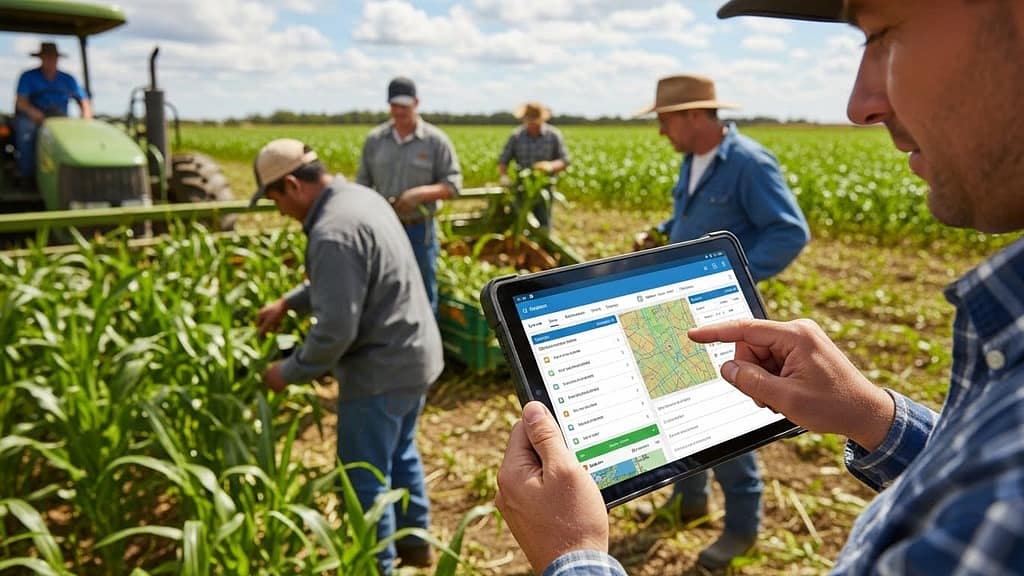
Workers should be able to log activities from their phone or tablet, even with limited connectivity. Offline data that syncs later is especially important in rural areas.Reporting and basic analytics
Look for built‑in reports on yields, costs, worker productivity, and input usage. Even simple dashboards can improve day‑to‑day decisions.Integrations with existing tools
If you use accounting software, payroll, or sensors like weather stations, check whether the system connects with those tools. Integrations reduce duplicated effort.

Usability and support considerations
Features matter, but they are not helpful if your team does not use them.
Ease of setup
You should be able to get started without heavy IT support. Templates for common workflows can shorten the learning curve.Simple, consistent interface
Look for tools that keep screens clean, with clear buttons and minimal steps. If your crew can learn it in a short training, adoption is more likely.Training resources
Videos, guides, or live onboarding calls can help you implement the software properly instead of guessing your way through it.Customer support
When something is not working, being able to reach a knowledgeable person quickly makes a big difference. Pay attention to support hours and response times.
Compare the top 5 farm operation automation tools
Below is an overview of five popular types of farm operation automation software. You will notice that each tool leans toward a particular focus. The best fit for you will depend on where you want to see improvements first.
1. Field operations management platforms
These tools center on planning and tracking activities across your fields, from planting to harvest. They are a strong starting point if you want better visibility into what is happening on the ground each day.
Typical capabilities:
- Map fields and record boundaries
- Plan tasks by crop, field, or growth stage
- Assign jobs to crews and track completion
- Log input usage for each pass over a field
- Generate activity and compliance reports
Best for you if:
- Your main goal is to coordinate fieldwork better
- You want reliable records for audits and certifications
- You need to reduce miscommunication between managers and crews
2. Farm management information systems
Farm management information systems, often shortened to FMIS, are broader. They combine field operations with basic financial and inventory tracking in one place. This can reduce the amount of back and forth between your farm office and the field.
Typical capabilities:
- Everything in field operations management
- Input and product inventories
- Basic budgeting and cost tracking
- Activity‑based cost allocation by field or enterprise
- Reporting on performance over time
Best for you if:
- You want to connect what happens in the field to your costs
- You are growing and need more structured planning
- You want a long‑term system of record, not just a task list
3. Livestock and facility automation tools
If your agribusiness involves livestock, barns, or controlled environments, automation looks slightly different. In these settings, you often deal with routine checks, feeding schedules, climate management, and animal health records.
Typical capabilities:
- Scheduling of feeding and care routines
- Health and treatment recordkeeping
- Integration with sensors or facility controls
- Alerts for temperature, humidity, or equipment issues
- Batch and lot tracking
Best for you if:
- You run intensive livestock operations or controlled environment agriculture
- You want to reduce the risk of missed checks or delayed treatments
- You already use sensors or automated equipment and need a central view
4. Agribusiness workflow automation platforms
These tools focus on the business side of your operation, such as purchasing, approvals, sales orders, and internal communication. They are ideal if your field workflows are under control, but your office processes feel slow or disorganized.
Typical capabilities:
- Request and approval workflows for purchases or maintenance
- Automated document routing and notifications
- Simple forms for data collection across departments
- Dashboards for tracking process status and bottlenecks
Best for you if:
- You frequently chase signatures or decisions
- You handle large volumes of paperwork or emails
- You want a flexible system that can automate both farm and office tasks
If you are already exploring small agribusiness workflow automation, many of these platforms will feel familiar. Some are general business workflow tools with templates for agribusiness, others are built specifically for farms.
5. Integrated farm‑to‑market suites
A smaller group of tools combine production, post‑harvest handling, and sometimes even sales into a single platform. They are often used by vertically integrated operations, cooperatives, or specialty producers with tight quality and traceability requirements.
Typical capabilities:
- Field or facility operations
- Post‑harvest handling, grading, and packing
- Inventory and lot tracking
- Order management and basic CRM
- Traceability reports for customers and regulators
Best for you if:
- You want an end‑to‑end system instead of multiple separate tools
- Traceability and quality documentation are central to your brand
- You are willing to invest more time in setup to gain a complete view
Match software types to your priorities
To make your choice easier, it helps to connect the type of software to the problem you most want to solve first.
Common goals and best tool types
| Your main goal | Best starting point |
|---|---|
| Coordinate crews and fieldwork | Field operations management |
| See costs and performance by field or crop | Farm management information system (FMIS) |
| Tighten livestock or facility routines | Livestock and facility automation tools |
| Speed up admin, approvals, and paperwork | Agribusiness workflow automation platform |
| Connect production with post‑harvest and sales | Integrated farm‑to‑market suite |
You do not need to commit to a perfect system on day one. It is often more practical to start with one area, prove the value, and then expand.
Plan your automation project in phases
Adopting farm operation automation software is less about picking a product and more about designing a manageable change for your business.
Step 1: Map your current workflows
Choose one or two key processes and outline them in simple steps. For example, you might map:
- How you plan and assign weekly field tasks
- How you purchase and track fertilizer
- How you record and report spray applications
Write down each step, who does it, and which tools you currently use, such as paper forms, messages, spreadsheets, or phone calls.
Step 2: Identify delays and manual steps
Look at your process and mark where information gets stuck or duplicated. Common points include:
- Waiting for approvals or signatures
- Entering the same data in multiple places
- Searching for missing notes or documents
- Manually creating reports from raw data
These pain points are prime candidates for automation, because improving them has a clear payoff.
Step 3: Define success for your first phase
Set simple, concrete targets. For example:
- Cut manual data entry for field records by half
- Reduce time spent chasing approvals each week
- Get daily visibility into completed tasks across all fields
Your success metrics do not need to be perfect. They simply need to be clear enough that you can tell whether the software is helping.
Step 4: Shortlist tools and schedule demos
Once you know your needs and goals, create a short list of tools that match your priorities and operation type. During demos, focus on:
- How your exact workflow would look inside the tool
- How a typical crew member would use it in the field or facility
- How easily you can generate the reports you need
Make sure you participate actively. Do not hesitate to ask the vendor to walk through your real‑world scenarios.
Step 5: Start with a pilot group
Rather than rolling out the software to your entire business at once, choose a pilot area or team. That might be:
- One farm or location
- One enterprise, such as row crops or greenhouse
- One process, such as spray records or purchase approvals
Spend a full cycle or season with the pilot. Collect feedback from everyone involved and adjust your setup accordingly.
Encourage adoption across your team
Even the best farm operation automation software will only work if your team uses it consistently. Planning for adoption is just as important as choosing the right features.
Involve your crew early
People are more willing to use a new system if they help shape it. Where possible:
- Include at least one field worker or supervisor in your evaluation
- Ask what would make their daily work easier or safer
- Show how the system will reduce extra paperwork for them
This turns the system into a shared tool, not just another top‑down requirement.
Keep training practical and short
Focus training on what each group actually needs to do.
- For field workers: how to receive tasks, log completion, and report issues
- For supervisors: how to assign work, monitor progress, and adjust plans
- For office staff: how to create workflows, generate reports, and manage data
Short, focused sessions work better than one long training day. Reinforce learning with simple written guides or short video clips if your software provider offers them.
Set clear expectations and check in regularly
Once you roll out the system more broadly:
- Decide which records must live in the software, and from when
- Avoid keeping parallel paper or spreadsheet systems for too long
- Schedule quick weekly check‑ins to address questions and small issues
This prevents the common problem of “we have software, but everyone still uses the old methods.”
Avoid common mistakes when choosing software
Many agribusinesses run into similar issues the first time they adopt automation tools. You can sidestep some of the biggest problems with a bit of planning.
Trying to automate everything at once
It is tempting to solve every operational challenge in one big project, but that often leads to:
- Overcomplicated setups that no one understands
- Staff fatigue and resistance
- Incomplete or inaccurate data in key areas
Instead, start with a limited scope, refine your approach, and then layer on more workflows once the basics run smoothly.
Ignoring data quality
Automation only delivers value if the data going into the system is reliable. Watch out for:
- Inconsistent units of measure
- Duplicate field or product names
- Missing or partial entries from busy days
Take time to define consistent naming and units at the start. This makes future reports and decisions much more accurate.
Choosing tools without thinking about integration
If you pick tools in isolation, you may end up with disconnected systems. Consider early on:
- Which existing systems you need to keep, such as accounting or payroll
- Whether you want sensor or equipment data integrated down the line
- How you plan to share information with partners or advisors
Even if you do not need all the integrations today, choosing tools that can grow with you will reduce future headaches.
Build a long‑term automation strategy
Once your initial tools and workflows are in place, you can gradually expand automation where it delivers the most value.
Extend automation beyond core operations
After you have a stable system for daily tasks and data capture, you can explore:
Seasonal planning
Build crop plans or production schedules inside your software so you can compare planned activities and actual results.Maintenance workflows
Automate service schedules for equipment or facilities, trigger work orders based on usage or calendar, and track downtimeCustomer and supply chain communication
Use your system to generate reports for buyers, suppliers, or auditors, reducing manual document preparation.
Use your data for continuous improvement
Over time, your farm operation automation software will accumulate a valuable history of your activities and results. You can use this history to:
- Compare performance across seasons or locations
- Identify fields or products that consistently underperform
- Test small changes in practices and monitor the outcomes
You do not need advanced analytics to benefit from this. Even regular reviews of a few key reports can help you refine your decisions each year.
Decide if you are ready to adopt automation
To figure out whether now is the right time to invest in farm operation automation software, consider a few simple questions:
- Are manual processes clearly slowing down your operation or causing mistakes?
- Do you struggle to get a clear, timely picture of what is happening across your fields, facilities, or teams?
- Are compliance, recordkeeping, or customer documentation becoming more complex each year?
- Do you see room to grow your business, but feel that your current systems will not scale with you?
If you answered “yes” to even a couple of these questions, it may be time to take the next step in your automation journey.
Start small. Choose one high‑value process, map it, and look for software that can automate that workflow cleanly. From there, you can build a system that supports the way you already work, while reducing friction and unlocking more time for the parts of the business that truly depend on your experience and judgment.
John Beluca is a Solutions Architect and founder of Procedo, with 20+ years of experience building custom CRMs and internal tools that simplify business processes.
All author posts