Understand automated farm management software
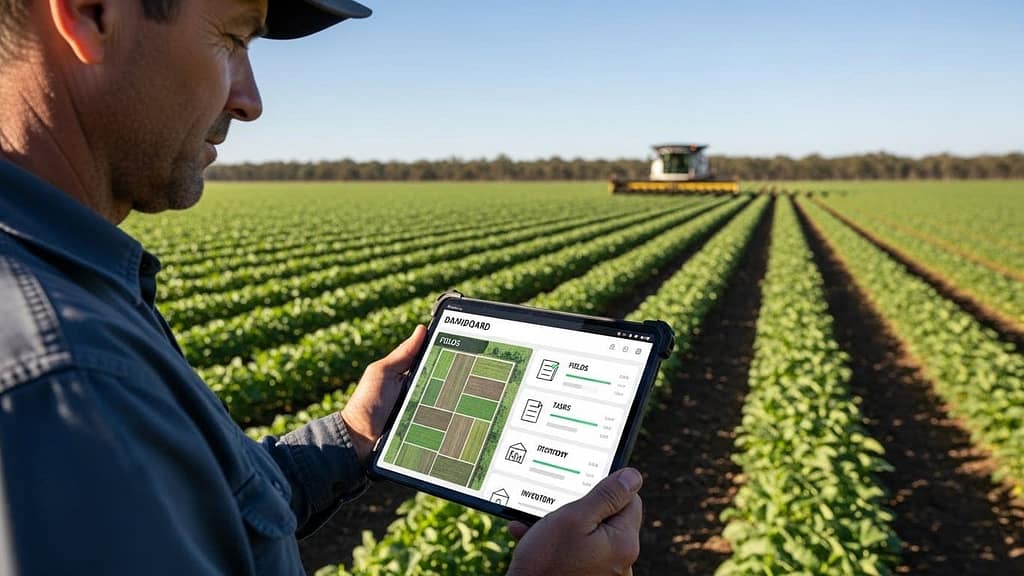
If you feel like you spend more time chasing paperwork than growing your business, automated farm management software can help you reclaim your day. This type of software centralizes your data and daily workflows, then uses automation to handle routine tasks in the background.
Instead of juggling spreadsheets, notebooks, and messaging apps, you work from a single system that can:
- Track fields, crops, and herds
- Record inputs and inventory
- Plan and schedule work for your team
- Capture costs and revenue by field, crop, or product
- Generate the reports you need for buyers, banks, and regulators
When you connect this with broader automation in agribusiness operations, you start to see a full picture of your farm or agribusiness in real time. That makes it easier to control costs, respond to weather and market changes, and find small process improvements that add up to big gains.
Key benefits for small and mid-sized agribusinesses
Automated farm management software is not just for large, corporate operations. If you run a small or mid-sized agribusiness, you can see clear value in areas like:
Time savings
Routine tasks like data entry, work-order creation, and basic reporting can be automated so you and your managers spend more time making decisions, not collecting information.Visibility across operations
You see what is happening in your fields, barns, warehouses, and trucks in one place. That clarity helps you spot problems before they become expensive.Cost control and profitability
Detailed tracking of inputs, labor, and equipment applied to each field or enterprise shows you what is truly profitable and what needs to change.Traceability and compliance
When records are captured as you work, audit trails and production history are ready when customers, auditors, or regulators ask.Stronger coordination with your team
Work assignments, notes, and updates move through the software, not through scattered texts and calls, so fewer tasks fall through the cracks.
Decide if you are ready for automation
Before you compare automated farm management software options, it helps to be clear about what you are solving for. You do not need to be a technology expert, but you do need a basic picture of your current pain points.
Common signs you are ready
You are likely ready for more automation if you recognize yourself in any of these situations:
- You keep the same data in multiple places, like a notebook, an Excel sheet, and your phone
- You regularly discover missing records at the end of the season
- You struggle to answer questions like “What did we actually make per acre on that field?”
- You rely on one person’s memory to know where equipment is or what work is done
- You spend nights or weekends catching up on paperwork for buyers, lenders, or government programs
If several of these ring true, introducing an agricultural software automation system is a logical next step.
Clarify your goals
You will get more value from any software if you set clear goals up front. A few examples:
- Reduce manual data entry by 50 percent in the next year
- Track cost of production per acre or per head for every enterprise
- Improve on-time completion of field tasks or work orders
- Cut input waste by matching plans and actual applications more closely
- Provide accurate traceability records to meet buyer requirements
Write your goals in plain language. You can use them later when you compare features and when you measure success after implementation.
Know the core features to look for
Most automated farm management software platforms claim to “do everything.” In practice, the best choice is the one that fits how you operate today and how you expect to grow.
Below are core features you will likely want, no matter your crop or livestock mix.
Centralized field, herd, and asset records
At a minimum, your software should give you a clean, organized way to see:
- Fields or production units with boundaries, crops, and history
- Herds, lots, or individual animals with health and movement records
- Equipment, storage, and other assets with maintenance and usage logs
Look for:
- Simple maps you can zoom and search
- The ability to attach photos, documents, or notes to each asset
- Quick ways to filter by crop, variety, field, herd, or location
Work planning and task automation
Work planning is often where automation pays off fastest. Helpful capabilities include:
- Seasonal plans turned into weekly and daily task lists
- Automatic work orders created from plans when certain dates or conditions are reached
- Task assignments to specific people, crews, or contractors
- Mobile notifications so workers see new tasks on their phones
- Status updates in real time as tasks are started and completed
Once you enter your cropping plan or production schedule, the software can handle much of the routine task creation for you.

Input, inventory, and purchasing management
Automated farm management software should track what you buy, where it is stored, and how it is used:
- Product catalogs with rates, costs, and suppliers
- Inventory by location, such as chemical shed, feed room, or warehouse
- Automatic inventory adjustments when tasks are completed
- Alerts when inventory drops below a certain level
- Simple purchase order creation that pulls in past suppliers and prices
This level of control helps you avoid surprise shortages and overbuying.
Labor and equipment tracking
To understand profitability, you need clean data on labor and equipment, not just inputs:
- Time tracking by worker, job, field, or herd
- Equipment hours logged automatically from tasks
- The ability to assign multiple workers and machines to one job
- Maintenance schedules tied to calendar days or usage hours
When labor and machinery are tied to specific activities, you gain a clearer picture of cost per acre or per unit produced.
Financial and performance reporting
Reports should not feel like extra work. The software should assemble them from the data you already collect during daily operations.
Useful reporting features:
- Cost and revenue per field, crop, herd, or product line
- Budget versus actual comparison for each enterprise
- Simple dashboards that highlight trends over time
- Export options if your accountant or lender needs spreadsheet copies
You do not need every possible report on day one. Focus on the few that directly support your earlier goals.
Match software types to your operation
Not every agribusiness needs the same style of automated farm management tool. The right choice depends on what you produce and how vertically integrated you are.
Row crop and field crop operations
If you focus on row crops or broadacre production, you will want:
- Detailed field mapping and history
- Strong integration with equipment and GPS data
- Planning tools for planting, spraying, fertilizing, and harvesting
- Support for variable rate prescriptions and as-applied records
In these settings, automation often centers on capturing machine data, minimizing passes, and tightening input use.
Specialty crop and horticulture growers
For fruits, vegetables, vineyards, greenhouses, and nurseries, pay attention to:
- Block or zone level tracking instead of just field level
- Labor-intensive task management, especially for hand work
- More granular harvest and quality records
- Strong traceability tools for audits and certifications
Your main automation wins will come from better labor coordination, yield forecasting, and record keeping for food safety.
Livestock, dairy, and mixed operations
If you manage animals in addition to crops, you need:
- Herd, group, or individual animal records with events and treatments
- Feed and ration planning tied back to inventory
- Breeding, calving, and health management tools
- Barn or pen level production and welfare tracking
Automation can help you align feed usage, animal performance, and health protocols without constant manual updates.
Integrated farm-to-market operations
Many small agribusinesses handle both production and some processing, packing, or direct sales. In that case, consider software that can:
- Track product as it moves from farm to packhouse or processing
- Record yield and loss at each step
- Support basic inventory and order management for customers
- Maintain traceability throughout the chain
Here, you benefit from connecting field data with post-harvest and sales activities so you see full cost and value.
Evaluate ease of use and adoption
Even the most feature-rich system will fail if your team cannot or will not use it. Ease of use should be a top selection factor.
Interface and workflow
When you test a system, pay attention to:
- How many clicks it takes to complete common tasks
- Whether screens feel crowded or simple
- If field staff can quickly find what they need without training manuals
Try to run through a real workday, from planning to task completion, and see where you feel friction.
Mobile access for field teams
In practice, your workers will interact with the software on their phones or tablets. Strong mobile support should include:
- Clear task lists with due dates and locations
- Offline functionality for areas with weak connectivity
- Simple forms for recording work completed, materials used, and notes
- Photo capture for issues, crop conditions, or completed jobs
If possible, involve a few team members in testing the mobile app. Their feedback often reveals practical issues earlier.
Training and onboarding
Good providers understand that you are busy. Look for:
- Guided setup or implementation support
- Short training sessions focused on your type of operation
- Help articles, videos, or live chat when you get stuck
You are not just buying software, you are buying a learning path for your team.
Plan for integration and data flow
Automated farm management software becomes more powerful when it can “talk” to other systems and devices you use.
Connect hardware and equipment where possible
Depending on your current setup, you might want your system to pull data from:
- GPS and guidance systems
- Sprayers, planters, and harvesters with telematics
- Environmental sensors in fields, barns, or greenhouses
- Weigh scales and grading equipment
Not every connection is essential from day one. Start with the few that will save you the most time or prevent the most errors.
Work with your existing financial tools
Some platforms include basic financial tools, while others focus on operations and integrate with your accounting software.
When you review options, ask:
- Can it export or sync data to your accounting platform?
- Does it support simple coding of costs and revenue that your accountant understands?
- Will you need to manually duplicate data entry for invoices or payments?
The smoother the connection between operations and finances, the less time you spend reconciling numbers.
Compare pricing and total cost
Price is important, but so is the value you receive and the cost of poor or partial adoption.
Understand the pricing model
Common pricing structures include:
- Per acre or per hectare
- Per user or per team
- Tiered plans with different feature bundles
Look closely at:
- Which features are included at each tier
- Whether mobile access or certain integrations cost extra
- Data limits that might affect you if you expand
Choose a plan that fits your current scale, with room to grow without major price jumps.
Consider total cost of ownership
The subscription fee is only part of the picture. Also factor in:
- One-time setup or implementation fees
- Time required from you and your staff for training
- Potential hardware upgrades, such as tablets for field workers
- Support or consulting costs after the first year
Balance these costs against the time savings, reduced waste, and better decision making you expect.
Build a realistic implementation plan
Rolling out automated farm management software is a project, not a switch you flip. A simple plan will help you see results faster and reduce disruption.
Start with one or two priority areas
Instead of trying to use every feature at once, begin with the functions that align with your top goals. For example:
- If traceability is urgent, start with field records and harvest logs
- If you need better labor control, begin with task scheduling and time tracking
- If you want cost clarity, focus on inputs, labor, and equipment tied to each field or herd
Once you are comfortable, you can gradually add more modules or workflows.
Involve your team early
You are more likely to succeed if your team feels included rather than surprised.
Practical steps:
- Explain why you are adopting the software and what problems it will solve
- Identify one or two “champions” who enjoy technology and can support others
- Schedule short, focused training sessions, preferably in the off-peak season
Encourage honest feedback so you can adjust workflows instead of blaming people when something is confusing.
Set simple, trackable milestones
To keep progress visible, define a few clear milestones, such as:
- All fields and herds entered with basic details by a specific date
- All work orders created and assigned through the system for one full month
- 90 percent of input applications recorded digitally within a season
Review these milestones regularly and celebrate when you reach them. Visible wins help maintain buy-in.
Measure results and refine over time
Your first season with automated farm management software will not be perfect. That is normal. The value comes from steady refinement.
Track both numbers and experiences
Measure:
- Time spent on manual data entry before and after
- Percentage of tasks completed on time
- Accuracy of inventory records compared to physical counts
- Variability in yield or cost per acre between fields or blocks
Also gather feedback from your team about what is working and what still feels clumsy. Often, small tweaks to workflows or screen layouts can improve adoption quickly.
Use insights to guide decisions
Over time, trends will emerge in your data. You might notice that:
- Certain fields consistently underperform relative to input cost
- Some work passes are habit that do not add much value
- Specific crews or equipment combinations complete jobs more efficiently
Use these insights to inform next season’s plans rather than relying solely on memory. This is where automation shifts from record keeping to real decision support.
Connect software automation to wider agribusiness strategy
Automated farm management software is one important piece of a broader move toward agricultural software automation systems across your business.
As you gain confidence, you can explore:
- More advanced data sources, such as remote sensing or predictive models
- Deeper workflow automation, like auto-generating purchase orders when inventory is low
- Stronger links between production planning and sales commitments
The goal is not to replace your judgment. It is to give you clearer, more timely information so your judgment has a stronger foundation.
Practical next steps
To move from research to action:
- List your three biggest operational headaches today.
- Turn those into simple goals, such as “reduce paper records” or “understand true cost per acre.”
- Shortlist a few automated farm management software providers that clearly address those goals.
- Request demos and insist on walking through realistic scenarios from your own operation.
- Choose one system, define a small initial rollout, and give your team time to learn it thoroughly.
By taking a structured approach, you give yourself the best chance to turn software automation into everyday value. Instead of feeling pulled in every direction, you gain a clearer view of your agribusiness and more control over where it goes next.
John Beluca is a Solutions Architect and founder of Procedo, with 20+ years of experience building custom CRMs and internal tools that simplify business processes.
All author posts